
Updated: October 25, 2026
Video podcasts are an editing job first
A lot of Miami businesses, coaches, real estate teams and creators now record their podcast on camera. The setup looks simple: two or three people at a table, a couple of microphones, a few cameras. The recording takes an hour. Then someone has to turn that hour into a watchable episode, a clean audio version, a stack of short clips for Instagram and TikTok, and thumbnails, every week, on schedule.
That is where most video podcasts stall. The recording is rarely the hard part. The edit is. A good podcast edit keeps the conversation natural, cuts to the right person at the right moment, fixes sound problems you did not notice in the room and pulls out the 40-second moments that make people want to watch the full episode.
This guide walks through how a video podcast is edited: getting files into sync, cutting a multicam conversation, cleaning the audio, and building a clip workflow that runs every week without burning out the team.
What comes out of a typical recording
Before the edit starts, the editor needs a clear picture of what was recorded. A common Miami studio or office setup produces:
- One wide shot showing everyone at the table.
- One close or medium shot per host and guest.
- A separate audio track for each microphone, recorded on an interface or a field recorder.
- Sometimes a screen recording or remote guest feed, if someone joins from outside the room.
Each camera usually also records scratch audio, which is useful for syncing even if it never makes it to the final mix. Remote guests add a wrinkle: their video and audio often arrive as separate files from the recording platform, at a different frame rate from your cameras.
Syncing cameras and audio
Everything has to line up before a single cut is made. Editing software can sync clips automatically by comparing waveforms, which works well when every camera recorded scratch audio. A clap or slate at the start of the recording makes it even more reliable.
Watch out for two problems on long recordings:
- Drift. Over 60 or 90 minutes, a camera and an audio recorder can slowly fall out of sync if their frame rates or sample rates do not match exactly. Check sync at the start, middle and end.
- Split files. Many cameras stop and start a new file every few gigabytes, or overheat in a warm room and shut down. The editor needs every segment, in order, with no gaps.
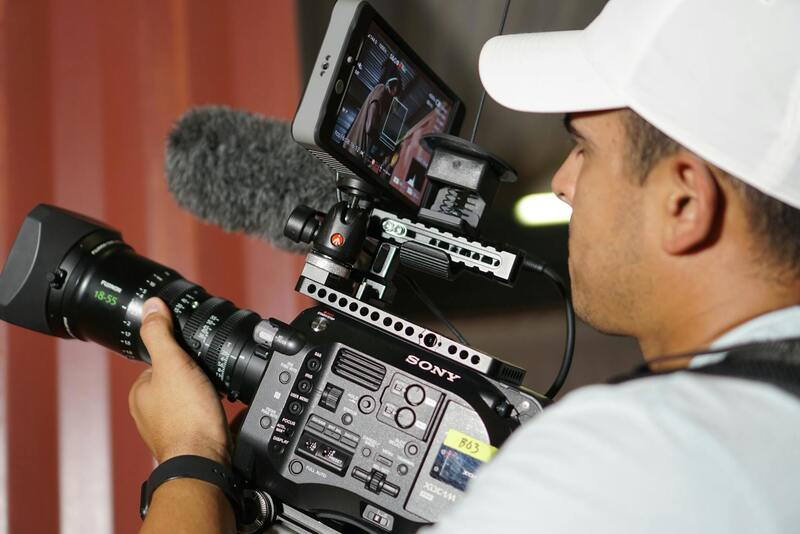
Once synced, the editor builds a multicam clip with all angles and all audio tracks. If you want more detail on how this works, our guide to multicamera video editing covers the setup step by step.
Cutting the conversation
Camera switching
The basic rule is to show the person talking, but a good edit is more interesting than that. Reaction shots of the listener laughing or nodding keep the conversation alive. The wide shot works when people talk over each other or when the energy of the room matters. Cutting on a pause or the start of a sentence feels natural. Cutting mid-word feels jumpy.
Many editors do a first pass with automated camera switching based on which microphone is loudest, then refine by hand. Automation saves hours, but it switches too often and misses reactions, so treat it as a rough draft.
Tightening without killing the flow
Most episodes benefit from trimming: false starts, long pauses, technical interruptions, a host checking notes, tangents that go nowhere. The goal is a faster episode that still sounds like a real conversation. Over-cutting every breath and "um" makes speakers sound robotic and hurried.
A practical approach is to agree with the host on what can always be cut (silences over a few seconds, retakes, crosstalk about the recording) and what needs approval (whole topics, opinions, anything about guests or clients). Editing transcripts make this faster, because the host can mark sections in a text document before the editor touches the timeline. The same method is used for editing interviews into a story.
Covering the cuts
Every cut inside a sentence is visible on camera. Editors hide them by switching angles at the cut point, using a reaction shot, or adding a short graphic or B-roll. On a single-camera podcast, small punch-ins (zooming into the frame by 10 to 20 percent) can disguise a jump, as long as the footage was shot at a resolution that allows it.
Cleaning the audio
People forgive average video on a podcast. They do not forgive bad sound. A typical audio pass includes:
- Choosing the best microphone for each speaker and muting the others while that person talks, to reduce echo and spill.
- Noise reduction for air conditioning hum, which is a constant issue in Miami rooms, plus traffic and the occasional leaf blower.
- Equalization and compression so every voice sounds clear and sits at a similar level.
- Loudness normalization to the targets podcast and video platforms expect, commonly around -16 LUFS for podcast audio and around -14 LUFS for many streaming video platforms.
Our article on audio post, dialogue cleanup and loudness explains each of these steps in more depth. If the episode will also go out as audio only on Spotify or Apple Podcasts, export a separate audio master from the same mix, so both versions match.
Turning episodes into clips
For most video podcasts, the short clips bring in new viewers and the full episode keeps them. Each episode can produce five to fifteen clips, and they need a different edit from the long version.
- Find the moments. A strong opinion, a useful tip, a funny exchange or a story with a clear ending. Mark them during the first pass so you are not watching the whole episode twice.
- Start fast. Clips that open with a question or a bold line hold attention. Cut the warm-up.
- Reframe for vertical. A 9:16 frame fits one person at a time, so a two-person exchange needs either split screen or quick cuts between speakers. See our guide to aspect ratios and reframing.
- Burn in captions. Most short clips are watched with the sound off. Accurate captions with names spelled correctly matter more than fancy animation. Our piece on captions, subtitles and transcripts covers formats and accuracy.
Bilingual shows, which are common in Miami, need extra care. Captions should follow the language actually spoken, and a clip that switches between English and Spanish mid-sentence needs captions that do the same, or a translation line underneath.
Making the weekly workflow sustainable
A podcast lives or dies by consistency. Editing systems that help:
- A template project with the intro, outro, lower thirds, audio chain and export presets already set up.
- A fixed recording setup, so camera positions and microphone levels do not change every week.
- A clear turnaround, for example full episode three working days after recording, clips two days after that.
- One person on the client side who approves cuts, so feedback does not arrive from four people in four directions.
Batch recording also helps. Recording three episodes in one session cuts setup time and gives the editor a buffer if a week gets busy.
Video podcast editing with Miami Video Services
We edit video podcasts for Miami businesses, agencies and creators, from single episodes to ongoing weekly shows. That includes syncing every camera and microphone, cutting the conversation, cleaning the audio, exporting the audio-only master, and producing captioned vertical clips ready for each platform. We can also set up a reusable template so every episode looks and sounds the same.
If you already record a show, or you are planning to launch one, tell us about your podcast: how many cameras, how long the episodes run and how many clips you want each week. You can also learn more about our editing team or read other post-production guides on our blog.